New Casper now works on Telegram Business →

Your Snapchat inbox,
on autopilot.

Casper is a Chrome extension that reads your Snapchat Web chats, replies in your persona with Casper AI, knows exactly when to share your link — and stops to ask you whenever a chat looks risky.

Download for Chrome

No API key needed · pay only for what you use · Card or crypto · Chrome desktop

The complete start kit

Starting from zero?
We give you everything to begin earning.

Never done this before? You don’t need experience, a team or a plan. Get the tool, the step-by-step playbook and a real person to guide you — all in one place, from day one.

  • No experience needed
  • Instant access
  • Lifetime guide access
  • Personal help on Telegram
  1. 01 Casper autopilot Replies in your persona, sends your link at the right moment and pauses risky chats.
  2. 02 Essential Guide The step-by-step system for complete beginners — how to pull traffic and turn chats into sales.
  3. 03 Your own VIP manager After purchase you get a personal contact on Telegram who assists you personally.
  4. 04 24/7 support Stuck at 3 a.m.? Ask. Help whenever you need it, and lifetime access to the guide.
See the Essential Guide

Works with

👻Snapchat Web ✈Telegram & Telegram Business ◉Chrome · Edge · Brave 🔗Fanvue, OF, Stacked & any link
0messages of context in every reply — Casper remembers what each fan told it
0shorter bot rules in compact mode — cheaper replies
0controls & alerts on your Telegram bot
0risky situations auto-paused for you (HOLD)minors · refunds & chargebacks · banned content · escorting · “stop” requests · self‑harm

Under the hood

The small things that make it feel human.

Casper isn't a chatbot with a script. These run on every single reply — quietly, so fans just feel like they're talking to you.

Remembers every chat

The last 60 messages of each conversation go into every reply — names, plans and jokes included. It never asks the same thing twice.

Reads every double-text

Three messages in a row? Casper answers each point, in one or two natural bubbles — like a real person catching up.

Never repeats itself

Code checks each draft against what was already sent. Too similar to an earlier line? It's rewritten with a new angle.

Sees photos & snaps

Reacts to what's actually in a photo, snap or story reply. Voice notes? It casually asks them to type it out.

Knows when to send your link

Casper reads each chat and picks the moment — when a fan asks for more, or with one soft lead once he's hooked. Then at most 4 follow-ups, each with a new angle. No spam, no begging.

Spots new subscribers

“Done”, “just subscribed”, “checked it 😍” — likely subscribers land in To review. You confirm with one tap.

Brings quiet fans back

Not subscribed yet? Instead of letting the chat die, Casper picks it back up later with a fresh message.

Texts like a human

Reading and typing time per character, natural pauses between chats — and in Auto it moves to the next unread chat by itself.

Safety before the AI

Minors, self-harm, “stop” requests and other risky chats are caught in code first — the chat pauses for you, nothing is sent.

Live demo

Watch Casper work an inbox.
Right here, in real time.

A faithful replica of the real extension running on Snapchat Web. Pick a scenario, flip Auto off for Draft mode, or just let it run.

🔒 web.snapchat.com
Casper
—
InboxCasper is watching your chats

In Auto mode Casper opens the next unread chat on its own.

Send a chat
Casper
Phase: idle $0.0000 📥 5
⚡ Entering chats 🚶 Medium
‹
Casperbot
Today
Event log — what Casper is doing right now

    Demo data only — names and messages are fictional. The real extension works inside your logged-in Snapchat Web tab.

    Two modes

    Draft when you want control.
    Auto when you want sleep.(Always)

    Draft puts the suggestion in the message box — you read it and press Enter. Auto sends it with a natural reading and typing rhythm, then moves to the next unread chat on its own.

      wyd tonight? 👀

      Interface

      Click through the real interface.

      The floating panel, the settings popup and your Snapchat chat list — fully interactive, with demo data.

      Casper
      Phase: 💬 chatting $0.0031 📥 3 💚 2 🔗 4 👥 ON 7/30 🔄 18 min

      In your chat list

      Every fan card shows where the chat stands.

      Casper adds a small phase badge to each fan in your Snapchat list, plus two quick buttons — so you can steer any chat without opening it.

      💬In progress🔗Link sent🔔Link — your decision✅Subscriber — done ⏰Snoozed🔒Closed🚨HOLD — your review
      🔒Close forever — Casper never enters this chat again. Tap 🔓 to reopen (re-engage).
      ⏰Snooze 6 h — Casper skips the chat until then. Tap ⏳ to wake it now.

      Try it — tap the buttons on the list.

      Chat🔍

      Casper theme

      Snapchat Web, in the Casper look.

      One switch gives Snapchat Web a calm, premium dark look. And the privacy screen blurs pics and snaps on your monitor while Casper keeps working.

      ‹Jjake_tCall
      TODAY
      JAKE_T
      hey 😏 what u up to tonight?
      ME
      just chilling in bed 🙈 why, u miss me?
      JAKE_T
      can i see more of u? 👀
      Send a chat
      Colors onlyNothing moves — Casper finds every button like before Privacy screenBlurs pics, snaps and videos — the bot still sees them One switchOn or off anytime in the popup

      Tools

      Tools that grow your results.

      Set your voice, test what sells, and see exactly what every chat earns and costs.

      Your persona, your voice

      Write who you are once — tone, style, boundaries — or start from 6 ready personas and fill in the blanks. Casper adds its own rules for links, repetition and safety, so your prompt stays short. A live meter shows what each reply costs.

      SweetPlayful bratConfidentGamerGymClassy

      A/B test two personas

      New chats split 50/50. Casper shows which persona turns more chats into subscribers — and how sure it is.

      A8%
      B29%

      Stats & real cost tracking

      Sent, links, subscribers, closed chats, HOLDs and spend — today, 7 or 30 days, with trends. You always know what your inbox costs.

      $ cost per chat & per day▲▼ trend vs. last period% cache hit rate

      Cost per subscriber

      Your account shows replies, chats, links and confirmed subscribers for 30 days — and what each subscriber cost you.

      $5.06per subscriber · example

      Fan notes & search

      Name, city, what they like — saved per fan and searchable from the panel or your phone.

      mike_rTexas · night shifts · plays Valorant

      Friend requests

      Optional auto-accept with conservative daily and hourly limits — one at a time, only when the inbox is clear.

      QA that costs nothing

      Random reply samples, link analytics and a full event log — all local, zero AI calls. Export anytime.

      Casper for Telegram

      The same Casper.
      Now on Telegram.

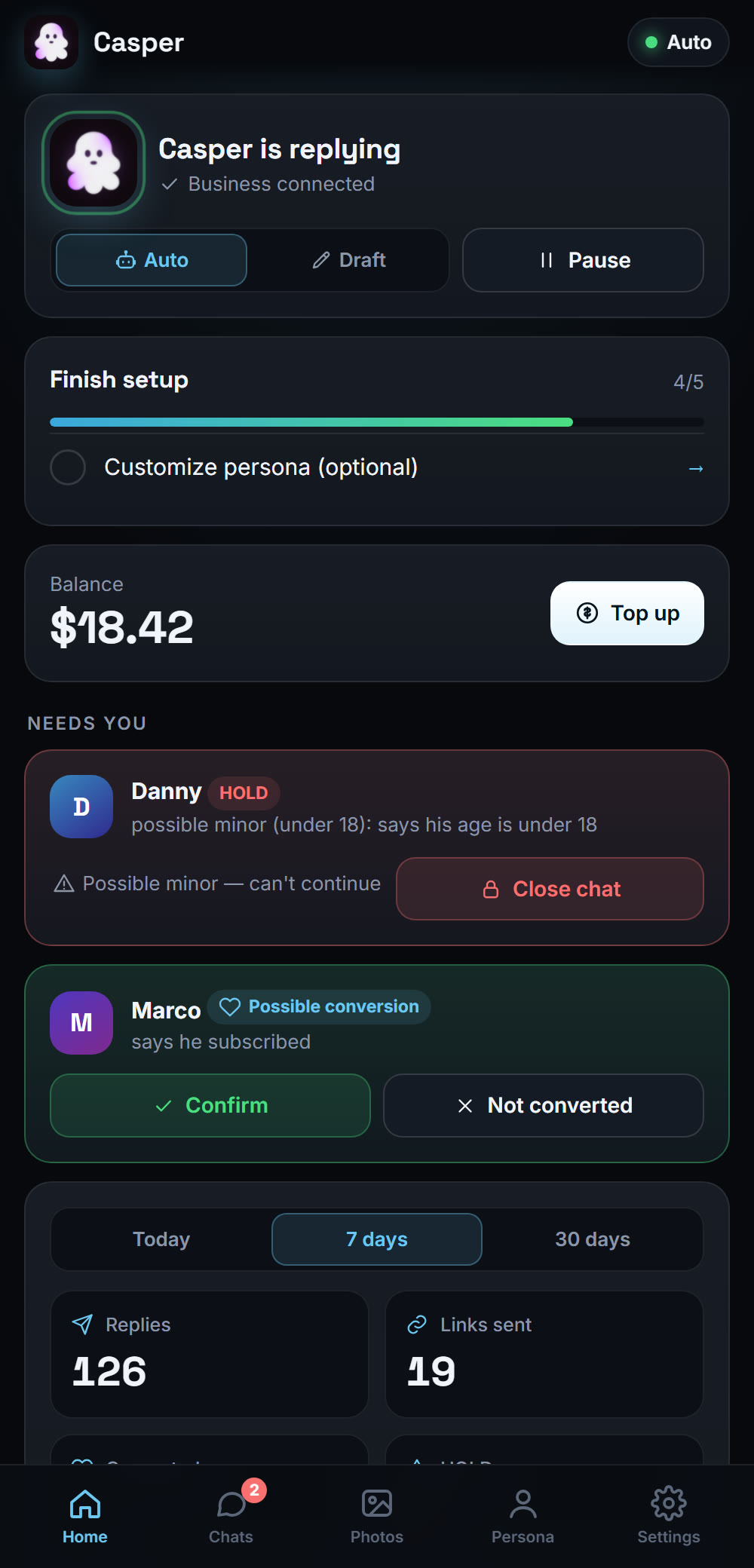
      Everything works like Casper on Snapchat — your persona, smart link timing, HOLD safety — but it replies in your Telegram Business chats, from the cloud, and you control it from a Mini App inside Telegram.

      • Same persona & rules
      • Runs 24/7 in the cloud
      • Controlled from a Mini App
      Open on Telegram

      Needs Telegram Premium for Business · same license key and credits as Chrome · Looking for the phone remote for Casper on Snapchat?

      This is the real app — tap around

      Phone remote · for Casper on Snapchat

      Control Casper from anywhere.

      Out with friends, at the gym, on vacation — your computer keeps chatting at home and your phone is the remote. Turn it on or off, fix a frozen tab, check today's numbers and answer every decision with one tap, from your own private Telegram bot. Want Casper itself on Telegram? →

      Auto on / offStart or pause replies from anywhere
      /on · /off
      Refresh the tabSnapchat stuck? Reload it — or reopen it if closed
      /refresh
      Live statusIs it running, unread chats, sent today, spend
      /status
      Your numbersToday, 7 and 30 days with a mini chart
      /stats
      HOLD decisionsContinue, close, snooze or open on PC
      /holds
      Confirm subscribersOne tap ✓ — and your stats stay accurate
      /conv
      Change speedSlow, medium or fast between chats
      /speed
      Find a fanSearch by name, note or message
      /find
      Alerts that find youTab closed, bot stopped, credit running low, friend list gone — critical alerts always come through, even on mute.
      Fixes itselfIf Snapchat freezes for 8+ minutes, Casper refreshes the tab on its own and tells you it's back.
      Setup in 1 minute Only you can control it Any phone, anywhere

      Try it — tap the buttons on the phone

      ‹
      Casperbot · online
      Today

      Safety

      It knows when to stop.
      And hands the decision to you.

      Some chats need a human. Casper spots them, stops on the spot and waits for you — nothing risky ever goes out on autopilot.

      A fan writes something sensitive
      Possible minorRefund / chargebackBanned contentEscorting“Stop” / leave me aloneSelf-harm or crisis
      Casper puts the chat on HOLDThe reply is never inserted or sent — in Auto the bot leaves the chat right away.
      You see it in the Casper panel and on TelegramA 🚨 HOLD badge in the panel, plus a Telegram alert with the last 8 messages and the reason.
      You decide
      ContinueClose chatSnooze 6 hOpen on PC
      Possible minor = hard stop

      “Continue” is never offered — not in the panel, not on Telegram — and the action is rejected in code even if someone tries.

      Approval is remembered

      Approve once and the same reason won't stop that chat again for 24 h. A new, different trigger still will.

      Your keys stay private

      Your license key and Telegram token live in your browser's extension storage. The key only ever goes to Casper's own server.

      No destructive remote commands

      Telegram can pause, resume and decide — it can't delete data or bulk-confirm subscribers.

      Setup

      Running in five minutes.

      No coding, no AI account, no API keys. Four short steps and Casper is chatting.

      01⏱ 1 min

      Buy credits

      Pick a pack, pay with crypto. Your license key appears instantly and lands in your inbox.

      See pricing →
      02⏱ 2 min

      Install in Chrome

      Download Casper, load it in Chrome and pin the ghost. Pictured step by step.

      Install guide →
      03⏱ 1 min

      Key, link & persona

      Paste your key and profile link, pick a ready persona or write your own.

      Persona tips →
      04⏱ 1 min

      Pair Telegram & go

      Connect your bot, start in Draft, switch to Auto when you like what you see.

      Telegram setup →

      Start the install guide →

      Pricing

      Launch pricing · our lowest rates

      No subscription.
      Pay only for what you use.

      Buy credit once, use it whenever. Every reply Casper writes takes a fraction of a cent from your balance — about $0.0048 on the default model.

      Chats stay in your browser No Snapchat password needed Telegram commands only from your chat Nothing renews — stop anytime

      Beginners · everything for day one

      ★ Premium add-onLaunch −50%

      Essential Guide

      The foundational system to pull traffic and convert chats into daily sales on complete autopilot.

      Instant accessStep-by-stepLifetime access24/7 support
      $400$200launch price · one-time

      Credit packs · pay as you go

      Starter

      Try it on your inbox.

      $25
      • $25 in credit
      • ≈ 5,200 replies
      • Card or crypto

      Regular

      A few weeks of busy chats.

      $50
      • $52.50 in credit +5%
      • ≈ 10,900 replies
      • Card or crypto
      Best value

      Pro

      For a full-time inbox.

      $100
      • $110 in credit +10%
      • ≈ 22,900 replies
      • Card or crypto

      Agency

      Several creators, one balance.

      $200
      • $230 in credit +15%
      • ≈ 47,900 replies
      • Card or crypto
      Every pack includes all features ✓ Draft & Auto✓ HOLD safety✓ Telegram remote✓ Stats & notes✓ Free updates
      Card or crypto10 coins & networks — scan a QR, credit lands in minutes Key in secondsShown at checkout and emailed to you Top up anywhereFrom the extension, the site or a one-click email link

      Reply estimates use the default fast model and a typical chat. Images, snaps and stronger models use more credit. Your live cost per chat is always visible in the panel.

      FAQ

      Questions, answered.

      What do I need to run Casper?

      Chrome (or Edge, Brave, Arc) on a desktop or laptop, a Snapchat account logged in at web.snapchat.com, and Casper credit — no AI account or API key needed. Telegram is optional but recommended. The computer has to stay on while Casper works.

      How does pay-as-you-go work?

      You buy credit (from $25) and every reply takes a small amount from it — about $0.0048 on the default model. Images, snaps and stronger models cost a bit more. The panel shows what each chat costs, and your balance updates after every reply. When credit runs low you get a Telegram alert; at zero the bot pauses until you top up.

      Does credit expire?

      Not while you use it. Credit is kept for 12 months after your last reply.

      Can I pay by card?

      Yes. Card, Apple Pay and Google Pay go through our payment partner's secure page, from $20. The partner may ask for a quick ID check and charges a small fee. Crypto works from $25.

      Will it sound like me?

      It sounds like the persona you write. Start in Draft mode, read the suggestions, adjust the persona, and switch to Auto once you're happy. The QA tab shows random reply samples for free.

      Does it send my link to everyone?

      No. Casper reads each chat and picks the moment: usually when a fan asks for more, sometimes with one soft lead after a long, engaged chat. Then it follows up a limited number of times and closes the chat. No spam, no cold pitches.

      Does Casper work on Telegram?

      Yes. Connect Casper for Telegram to your Telegram Business account (Telegram Premium required) and it works just like Casper on Snapchat — your persona, link timing and HOLD safety — replying in your Telegram chats from the cloud, controlled from a Mini App. It uses the same license key and credit as the Chrome version.

      What happens with risky chats?

      Anything sensitive — age, refunds, real family members, extreme requests, crisis — puts the chat on HOLD. Nothing is sent, you get notified, and you decide. Chats with a possible minor can never be continued by the bot.

      Is automation allowed on Snapchat?

      Snapchat's terms restrict automated use, so there is always a risk to the account. Casper keeps a calm pace and conservative limits, but nothing can guarantee an account won't be restricted. You are responsible for following the rules of every platform you use.

      Which cryptocurrencies do you accept?

      USDT and USDC (TRON, Solana, BNB Chain, Ethereum), BTC, ETH, SOL and LTC. Stablecoins on TRON or Solana have the lowest fees; Ethereum is the most expensive.

      I lost my key / I'm on my phone. How do I top up?

      Go to My account and sign in with the email you used at checkout — we send you a 6-digit code, no password needed. There you can see your balance, top up and show your license key. Always use the same email: one email = one account and one key.

      Is there a subscription?

      No. Nothing renews and nothing is charged automatically. You top up only when you want to.

      Can I top up from the extension?

      Yes. Click + Top up in the Casper popup, pick a pack and a coin, and scan the QR code with your wallet. Casper confirms the payment by itself and your balance updates in a few minutes. Low on credit? You also get a one-click top-up link by email and on Telegram.

      How are subscribers counted?

      Only fans you confirm with ✓ — in the panel or on Telegram. Casper can't see your Fanvue or OnlyFans subscriber list, so it never counts anyone on its own. Your account page then shows confirmed subscribers and what each one cost you.

      What is the Essential Guide?

      An optional premium add-on: our step-by-step system for pulling traffic and turning chats into daily sales. One-time payment, instant download from your account, yours for life, with 24/7 support and a personal VIP manager on Telegram. You can buy it alone or together with a credit pack.

      Do you have promo codes or a referral program?

      Yes. Enter a promo code at checkout for bonus credit or a discount on a pack. And every customer gets a personal referral link: friends get bonus credit on their first top-up and you earn a share of what they top up for 12 months.

      Refunds?

      Unused credit can be refunded within 14 days of purchase, minus payment fees. See the terms.

      Your inbox, handled. Always.

      Questions before you buy? Ask in our Telegram group or message us — we usually answer within a few hours.